

Hour of Code Activities for K–5

It’s almost time to celebrate the Hour of Code! The Hour of Code is the perfect time for students to learn about the foundations of coding, practice programming skills, and explore robotics.
The best part? You don’t need to be a coding expert, and you don’t even need devices! Here is exactly how I plan an hour of coding for Kindergarten through 5th grade: a read aloud, unplugged activities, and then optional apps or robots.
In this post
1. What is the Hour of Code?
The second week of December is Computer Science Education Week, when students around the world spend a full hour practicing programming in a variety of ways. Code.org now calls its big event the Hour of AI, but the heart of the week hasn’t changed one bit: an hour of hands-on coding! That hour can be unplugged, screen-free coding activities, coding apps or websites, or coding with robots, and this post has my favorites for all three.
2. Coding Read Alouds
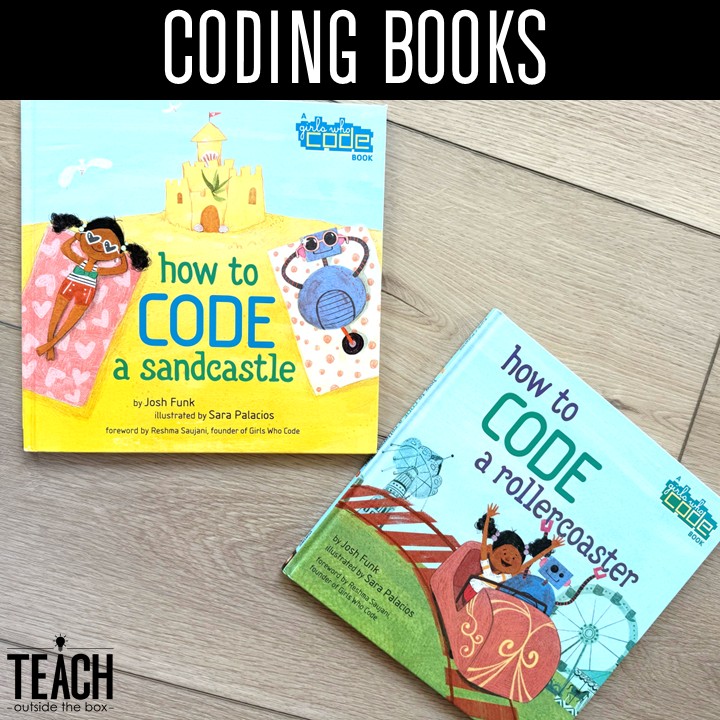
To introduce the concept of coding to my students, I use two read alouds every year. How to Code a Sandcastle by Josh Funk is a smart and creative way to introduce students to the basics of coding. The author compares introductory coding methods (sequencing, conditions, and loops) to the steps of building a sandcastle in a simple, kid-friendly way that is appropriate for even the youngest learners. After reading this book to my students, even my Kindergartners are able to understand basic coding terms as we apply them to apps and websites.
How to Code a Rollercoaster features the same characters with a similar storyline, and it’s perfect for second grade and up. This read aloud introduces the coding concept of variables in addition to sequencing, conditions, and loops.
3. Hop Scotch Coding®


After reading this book, my students play Hop Scotch Coding® to interactively experience sequencing, conditions, and loops. They work in teams to create different sequences of unplugged code on the floor, and then take turns walking through the code and acting out the conditions.
The best part?! There are no devices, no screens, and SO much movement! For December, Holiday & Winter Hop Scotch Coding® adds a Holidays Around the World twist, and Hop Scotch Dance Party is my “big kids” version for 2nd–5th grade.
Want them all? The Hop Scotch Coding® BUNDLE on TPT has all 10 in one download.
4. Unplugged Coding

Students can also practice unplugged coding with partners with my Gingerbread Unplugged Coding activity. One student creates a coding map, then the other student writes the matching sequence of code to help the gingerbread man navigate to the gingerbread house. This activity is a big hit with my youngest learners, and they love taking turns creating maps and writing code. I place the coding sheets inside dry erase pockets so that students can reuse them over and over.
This activity is part of the Unplugged Coding All Year BUNDLE on TPT, which puts all 9 resources together in one download.
5. Coding Apps and Websites

After some unplugged coding, students are ready to dive into some coding apps and websites! These are a few of my faves:
- Kodable (my personal favorite)
- code.org
- Scratch Jr.
- Bee-Bot
- Swift Playground
6. Coding with Robots

Robots are my final stage of teaching coding, and they are a huge hit every December! My Holiday Robot Stations work with almost any moving, programmable robot, including Bee-Bot, Dash, Sphero, Code & Go Mouse, and Botley, so you can use whatever your school already has.


New to classroom robots? My Elementary Robotics post walks through each one.
7. Hour of Code by Grade
- Kindergarten–1st: How to Code a Sandcastle, Hop Scotch Coding®, then Gingerbread Coding with a partner.
- 2nd–3rd: How to Code a Rollercoaster, Hop Scotch Coding® with loops, then Kodable or Scratch Jr.
- 4th–5th: Hop Scotch Coding® Dance Party, code.org, then Upper Grades Robot Stations.
Planning December? Pair the Hour of Code with my low prep Christmas STEM challenges, plus FREE Holidays Around the World LEGO building cards.
More Coding and Robotics on TPT
Ready for more Hour of Code fun? These are my go-to coding and robot sets for December and all year long. Click one to see it on TPT!


This post contains affiliate links. If you buy through them, Teach Outside the Box earns a small commission at no cost to you.